
Introduction
If you’re on a journey to eat healthier, lose weight, gain muscle, or simply understand your nutrition better, MyFitnessPal is one of the most well-known tools you can use. With a powerful food database, exercise logging, macro tracking, and community features, MyFitnessPal helps millions worldwide keep their health goals in check.
In this article, we’ll dive into how MyFitnessPal works, its free vs. premium features, advantages and drawbacks, safety considerations, and tips to get the most out of it.
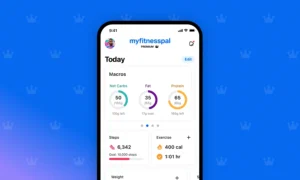
What Is MyFitnessPal?
MyFitnessPal is a freemium health and fitness tracking app and website that enables users to log food intake, track exercise, monitor weight and body metrics, and analyze nutritional data.
Originally launched in 2005, it has grown to become one of the most popular nutrition apps globally. It also integrates with third-party apps and devices like Fitbit, Garmin, Samsung Health, Apple Watch, and more.
How MyFitnessPal Works
-
Setup & Goal Setting
After you register, you input your age, height, weight, activity level, and goals (weight loss, maintenance, or gain). Based on that, MyFitnessPal suggests a net calorie target to aim for.
-
Logging Intake & Exercise
You log meals, snacks, and drinks in the food diary. The app tracks calories consumed. You also log workouts or physical activity, and the app credits calories burned. The net result helps you see how many calories remain to meet your target.
Over time, MyFitnessPal learns your frequent foods and exercises, making logging faster and easier.
-
Analyzing Progress
You can check your weight, macro trends, nutrient breakdowns, and see charts of your progress over time. The app also adjusts goals if your weight changes.
That’s the core workflow: log → analyze → adjust → repeat.
Free vs Premium: What You Get
Free Version Features
Even without paying, you gain access to many essential tools:
-
Food & exercise logging
-
Recording weight, body measurements, and tracking progress
-
Ability to create custom foods, meals & recipes
-
Viewing macronutrient breakdowns (carbs, fats, protein)
-
Basic sharing of your diary with others or privacy settings
-
Linking with partner apps and devices for syncing data
The free version is often enough for casual users who want to monitor diet and exercise.
Premium (Paid) Features
Upgrading unlocks advanced capabilities:
-
Ad-free experience
-
Set macronutrient goals by grams (not just percentage)
-
Deep food analysis: see which foods benefit or hurt your goals
-
Custom goals for different days (e.g., rest vs workout days)
-
Exercise calorie settings so that workouts don’t inflate your target
-
Dashboard with nutrient overviews
-
Data export (meal, progress, history)
-
Macronutrients per meal (so you can see each meal’s macro split)
-
Timestamps on food entries (to observe when you eat)
-
Recipe discovery, workout routines, net carbs mode, multi-day logging, voice logging, etc.
Premium is designed for users who want more control, insights, and flexibility beyond the basic tracking.
Pros & Strengths
-
Huge food database: millions of items including packaged foods and user contributions
-
Barcode scanning & Meal Scan (premium): log foods faster by scanning labels or even your entire plate
-
Compatibility & integration with fitness trackers and devices
-
Community & motivation: many users value sharing and encouragement from others. One user said they only recently discovered the “meal function,” which saves a lot of time.
-
Flexible goal settings: Premium lets you customize goals daily, adjust macros, etc.
-
Long track record: established reputation over many years, continuous updates & support.
Cons & Challenges
-
Some features locked behind paywall: Some users have expressed frustration that features like barcode scanning or advanced analysis are moved into premium.
-
Ad experience in free version: The free version includes ads, which can become annoying to some users.
-
Data accuracy & user-generated content: Because many food entries are contributed by users, inaccuracies in nutritional data sometimes occur.
-
Privacy & past security breaches: In 2018, a data breach exposed usernames, email addresses, and hashed passwords of about 150 million users.
-
Over-focus on numbers: Some users find tracking every detail psychologically taxing or obsessive.
-
Regional limitations: Food database coverage and barcode scanning may be less accurate in certain countries.
Privacy & Security Considerations
Because MyFitnessPal collects personal and health-related data, it’s important to be cautious:
-
Use a strong, unique password and change it periodically (especially given its breach history).
-
Be careful about what personal info you store (e.g. medical data) in notes.
-
Review and understand privacy settings — limit what’s shared or public.
-
Take advantage of data export and deletion tools if needed.
-
Stay updated on the app’s privacy policy changes.
Tips to Get the Most Out of MyFitnessPal
-
Use “Favorites” or “Frequent” foods for faster logging.
-
Pre-log meals — many users say this helps with consistency.
-
Use “meal” or “recipe” features to log complex meals in one go.
-
Don’t get obsessed — track what matters (calories + macros), but don’t stress over every minor detail.
-
Review trends weekly — look for patterns, not just daily fluctuations.
-
Use integration with fitness devices — steps, heart rate, etc., help fill out your activity picture.
-
Start with free version — many users find it sufficient; upgrade only if you need more control.
Is MyFitnessPal Worth It?
For many users, yes — especially those who value tracking, insights, and a large food database. The free version often suffices for basic goals, while Premium gives serious users more customization and features.
However, if you find the premium cost too steep, or if privacy is a serious concern, you might consider alternative apps. Always choose the tool you’ll stick with consistently, because consistency is more important than perfection when it comes to health tracking.
Conclusion
MyFitnessPal remains a powerful, versatile companion for anyone wanting to take control of their nutrition and fitness data. Its blend of logging features, compatibility, and customizable settings has made it a staple in the health & fitness world.
That said, it’s not flawless — premium divides, ads, data privacy, and occasional inaccuracies must be considered. But for millions, its value lies in helping maintain awareness, build habits, and track progress over time.
Try the free version first. See if daily logging fits your lifestyle. Then decide whether Premium features are worth it for your goals.
🔗 Explore more apps, health tools & game content at APK CAX